Make your AI agent explain the code it wrote
Claude Code and Codex made generating code fast. Reviewing it didn’t get any faster. If you’re still the person who signs off on what your agent produced, do you really understand all of it? A walkthrough is how you get the agent to show you the parts you actually need to see.
Reviewing AI-generated code doesn’t scale
A morning with Claude Code or Codex produces more diff than a careful afternoon of review can absorb. Being stricter with yourself doesn’t fix it. Writing code got fast and reading it didn’t.
Agent-written code also looks fine, which doesn’t help. Formatting is clean, names are sensible, the logic reads like somebody meant it. Nothing catches your eye, so you skim faster, and the one part that was actually wrong goes by with everything else. It’s very easy to spend an hour looking like you reviewed something.
The agent explains itself, you still decide
Most tools answer this by putting an AI in the reviewer’s seat and handing you its verdict. Now you’re not reading the code, you’re deciding whether to believe a second bot about code you still haven’t read. It also cuts out the one participant who knows what the change was supposed to do.
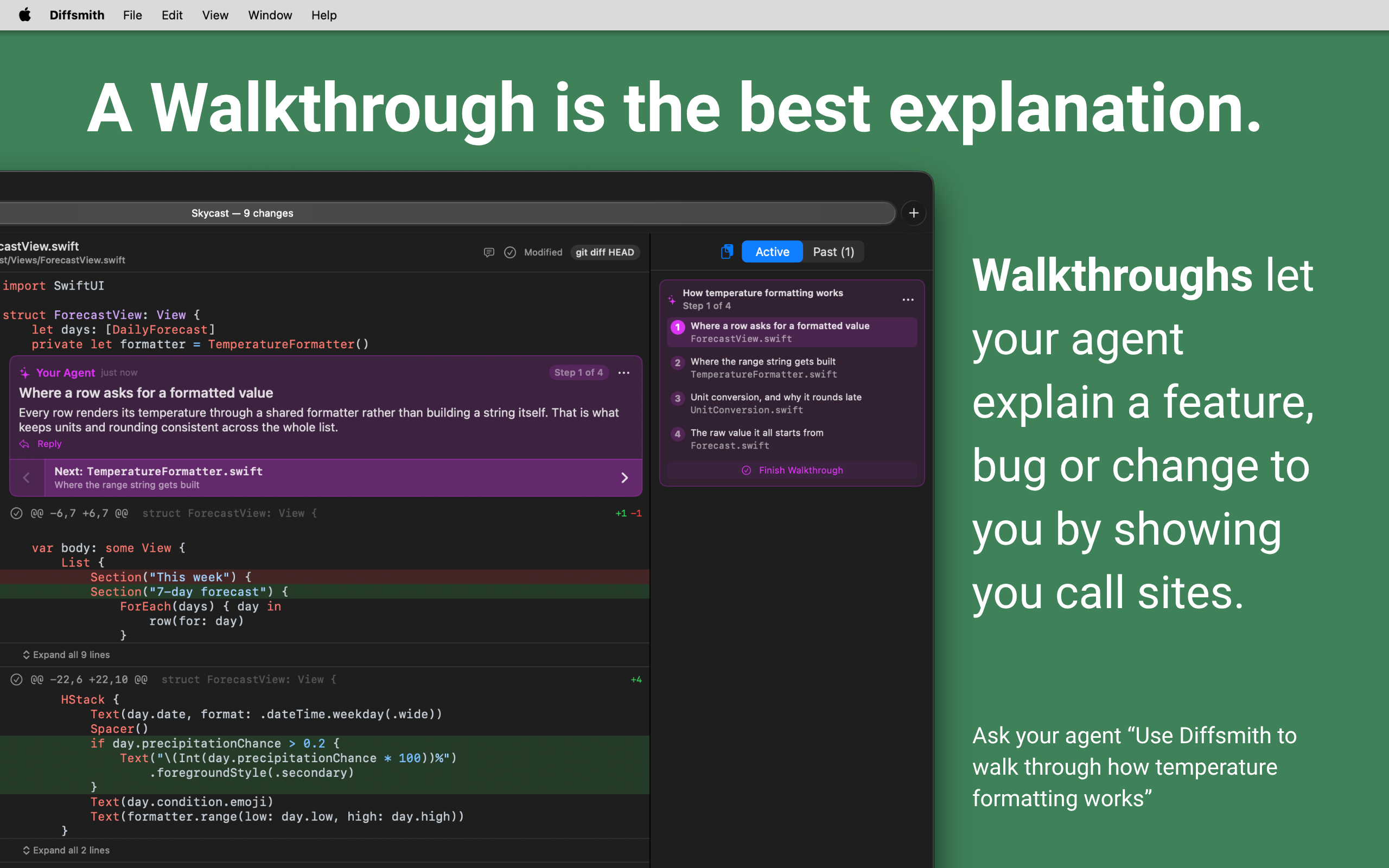
Diffsmith keeps you in that seat. A walkthrough makes the agent explain itself instead, on the code, one step at a time, in an order it picked. Step 3 of 6 is a comment sitting on the line it’s about, with the file open around it. Move with the arrow in the step’s ribbon, or click any step in the sidebar to jump straight there.
When a step doesn’t convince you, reply to it. Replies are ordinary review comments, so the agent reads them over MCP and answers on the same line. Nothing is approved, scored, or merged for you.
How to ask your agent for a walkthrough
- Turn on the local MCP server in Diffsmith and connect your agent. The setup guide has copy-and-paste snippets for Claude Code, Codex, Cursor, Windsurf, VS Code and Zed.
- Open the repository in Diffsmith. It doesn’t need uncommitted changes; a walkthrough works on a repo that’s completely clean.
- Ask for the tour in plain language.
- Diffsmith announces the walkthrough when the agent finishes writing it. Start from the banner, or from the Walkthrough section at the top of the sidebar.
Things worth asking for:
“Walk me through the change you just made, in Diffsmith. Start with anything I’m likely to disagree with.”
“Use Diffsmith to walk me through how temperature formatting works.”
“You touched 40 files. Give me a Diffsmith walkthrough of the 6 that actually matter and tell me why the rest don’t.”
“I’m new to this repo. Give me a Diffsmith walkthrough of how a request gets from the router to the database.”
That third one is the one to try first if you’ve been drowning. An agent knows which of its edits were mechanical and which involved a judgement call. Asking it to sort them is cheap, and it turns an unreadable diff into a short list of decisions you can review properly.
Walkthroughs reach code your agent didn’t change
Any file, not just changed ones. Half of why a change is right lives in code nobody touched this week. A step can land on any line of any file in the repository. Diffsmith opens that file with context around the step and folds the rest behind the usual expanders, so you can read past the part the step was about, and Command + F still searches the whole thing.
Any commit. Each step carries the commit it belongs to, so a tour can start in a change from three weeks ago and end in your working tree. Diffsmith switches comparison as you step, without burying the comparison you chose yourself in your recents. If a step’s commit has since been rebased away, that step is skipped rather than dead-ending the tour.
Code that hasn’t been written yet. Reviewing a plan is cheaper than reviewing a diff. Ask for a tour of the call sites a change will affect, step through them, and reply where you disagree, before the agent writes anything.
Stepping through a walkthrough
The current step gets a ribbon under its comment: previous on the left, the next step in the middle, and Finish Walkthrough when you reach the end. Steps you aren’t standing on are dimmed, so it’s always clear where you are. You can end one early from the step list at any point.
Finished walkthroughs move to Past as a single row, not a scattering of loose comments, and you can replay one later. Your own comments stay where they were the whole time: a walkthrough sits above them in the inspector rather than taking the pane over.
Notes
- One published walkthrough per repository at a time. Ending the current one clears the way for the next.
- A walkthrough only becomes visible once the agent publishes it, so you never see a half-written tour or a “Step 2 of 5” that turns out to be wrong.
- Steps are written entirely by your agent, and Diffsmith withholds them when the agent lists comments again. It doesn’t pay twice to read back narration it just wrote. Your replies do come through.
- Everything is local. The MCP server is loopback-only, off by default, and Diffsmith makes no outbound network calls of its own.
You still decide whether the code is any good. You just don’t have to reverse-engineer it first.

US$5.99 · one-time purchase · macOS